Search Court Records by Name
Enter first name, last name, and state to prepare a court records search.
Waterbury Probate Court CT Records, PD-20 Case Lookup, eFiling, Forms & Court Help
Use official Connecticut Probate Court resources to verify Waterbury Probate Court PD-20, search decedent estate and trust cases, understand document-access limits, use eFiling, find current PC forms, estimate fees, confirm contact details, and route children’s probate matters correctly.
What Is the Correct Waterbury Probate Court?
Waterbury Probate Court is Connecticut Probate District PD-20. The official Connecticut Probate Courts listing shows the court at 49 Leavenworth Street, Waterbury, CT 06702. The listing names Judge Matthew P. Vaccarelli, Chief Clerk Tracy L. Biolo, telephone (203) 755-1127, fax (203) 597-0824, and towns served Waterbury and Wolcott.
Use the statewide Connecticut Probate Courts tools for case lookup, court location, forms, eFiling, fee estimates, document access, and resource guides. Use Waterbury Regional Children’s Probate Court only when the matter is a children’s probate matter routed to PD-58, not for ordinary decedent estate or trust lookup.
Official Site Screenshot: Waterbury Probate Court PD-20
This screenshot helps users visually confirm that they are using the official Connecticut Probate Courts Waterbury Probate Court page, not a private record site, outdated directory, or wrong court listing. Use it to recognize the official source, then open the live page for current hours, phone, fax, judge, clerk, directions, and towns served.
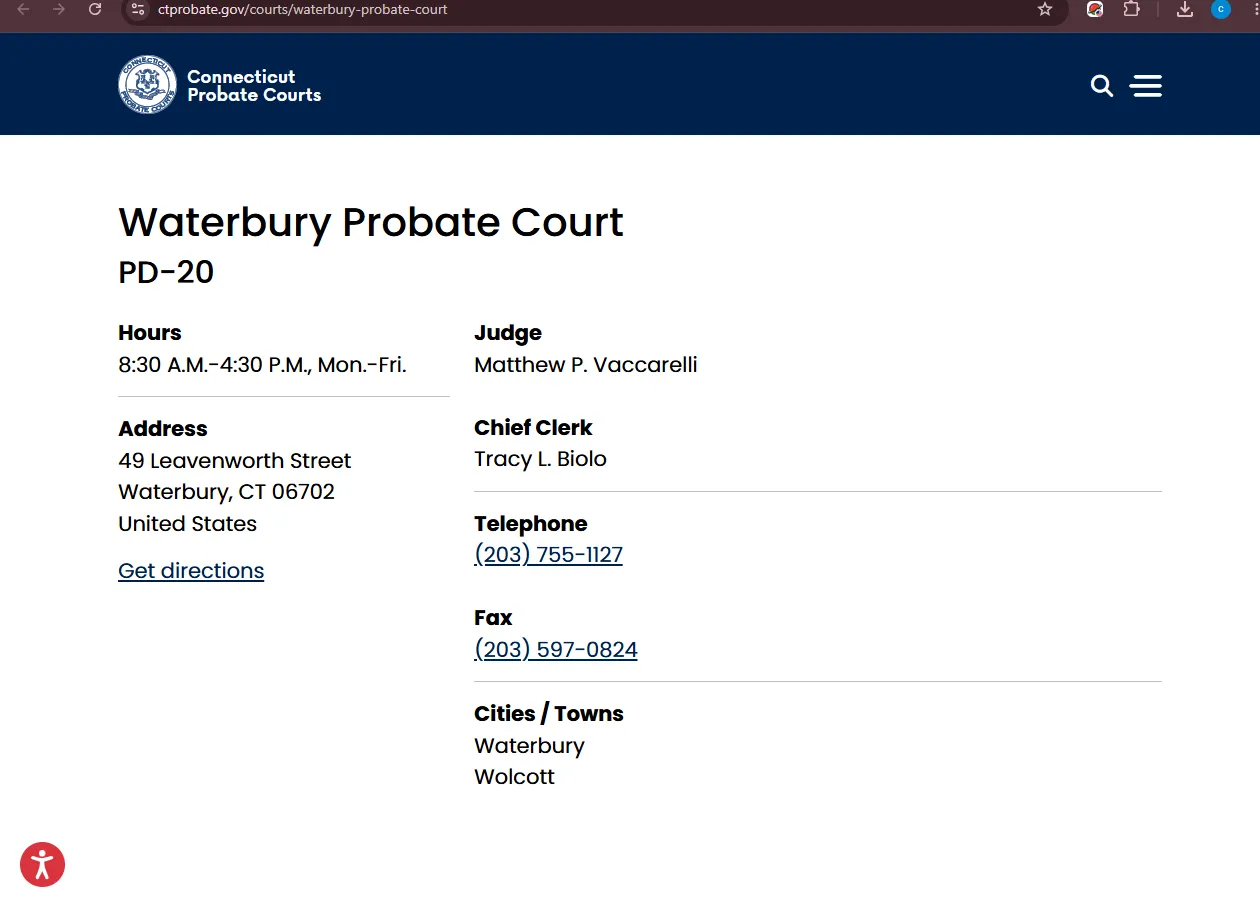
Image description: WebP screenshot of the official Connecticut Probate Courts Waterbury Probate Court page used to verify PD-20 district details, court address, judge, chief clerk, telephone, fax, hours, towns served, case lookup routing, eFiling, probate forms, document access and fee tool guidance for Waterbury and Wolcott users.
Find the Right Waterbury Probate Step
Choose the task closest to what you need. This tool does not search live records on this website; it points users toward official Connecticut Probate Court pages so they do not confuse case lookup, eFiling document access, forms, fee calculators, adult probate matters, or regional children’s probate matters.
Search Waterbury probate case lookup
Decedent estate and trust case lookup, district confirmation, fiduciary contact checks, and case-number research.
Use the Connecticut Probate Courts Case Lookup Tool and select PD20 — Waterbury Probate Court when appropriate.
Case data is mainly available from January 5, 2011 to present for decedent estates and trust matters.
What This Updated Waterbury Probate Guide Fixes
Many probate pages give only an address or a generic case-search link. This refresh separates the actual user tasks: PD-20 court verification, official case lookup, document access limits, eFiling eligibility, forms by category, fees and expense calculators, adult estate and trust matters, and Waterbury Regional Children’s Probate Court routing.
No private-record shortcut
Users are directed to official Connecticut Probate Courts tools before private people-search or paid record pages.
Lookup is not everything
The article explains the date limits, document-access limits, and why a lookup result may not be enough for legal use.
Adult vs children’s court
Waterbury Probate Court PD-20 and Waterbury Regional Children’s Probate Court PD-58 are clearly separated.
Official Waterbury Probate Court Path in Connecticut
Start with the official Waterbury Probate Court district page when you need to verify the court name, district number, address, hours, judge, chief clerk, phone, fax, or cities and towns served. For online research, use statewide Connecticut Probate Courts tools such as Case Lookup, Court Location Finder, eFiling, forms, viewing-case-documents guidance, and fees and expenses tools.
Waterbury Probate Court is the local probate district for Waterbury and Wolcott adult probate matters. It may be the first official court contact for decedent estates, trusts, fiduciary questions, conservatorship matters, adult guardianship or related records questions. Children’s matters may route through Waterbury Regional Children’s Probate Court, so do not assume every child-related issue belongs on the same PD-20 path.
How to Search Waterbury Probate Court Cases Online
The Connecticut Probate Courts Case Lookup Tool is useful, but it is not a universal public file search for every probate document. The official case lookup page says data is available from January 5, 2011 to present for decedent estates and trust matters, while pre-2011 data may be incomplete.
Open the official Case Lookup Tool
Use the Connecticut Probate Courts Case Lookup Tool before paid or private record websites. Select the correct case type and district when available.
Use strong search details
Search by decedent name, trust name, case number, fiduciary name, district name, or other identifiers. For Waterbury district matters, look for PD20 — Waterbury Probate Court.
Check the date and case-type limitation
Case lookup is strongest for decedent estates and trusts from January 5, 2011 to present. Older, archived, confidential, children’s, conservatorship, guardianship, or other matters may require direct court contact.
Click the case number or district name when available
The case lookup guidance says fiduciary contact information can be available by clicking the case number, and Probate Court contact information is available by clicking the district name.
Contact the court for legal-use documents
If you need a certified copy, document image, court order, fiduciary proof, or more than a summary, use official document-access guidance or contact Waterbury Probate Court directly.
Search warning: A case lookup result can help you find the right matter, but it is not the same as a certified copy, official decree, fiduciary appointment, court order, or complete court file.
Viewing Waterbury Probate Court Documents Through eFiling
Connecticut Probate Courts document guidance is clear: there is no general pending-case lookup in the eFiling system. Only interested parties and attorneys can view court documents through eFiling. Self-represented persons may need approval from the Probate Court and an access code mailed to the last known mailing address.
Practical document tip: Before calling, prepare the case number, party name, document title, whether you are an interested party, and whether you need a certified copy, plain copy, document review, or eFiling access.
Waterbury Probate Court Forms for Estates, Trusts, Conservatorship and More
The Connecticut Probate Courts forms list explains that Probate Court forms use the prefix “PC” and are organized by jurisdictional and functional categories. This matters because users often download the wrong form from private pages or older PDFs. Always use the current official forms list or the subject-specific forms page.
Estate and will forms
Use trusts and estates forms for probate of will, administration, affidavits, inventories, financial reports, waivers, notices, and fiduciary filings.
Protected adult matters
Use conservatorship forms and guidance when a person may need help managing personal care, property, accounts, or court-supervised responsibilities.
Forms by number and category
Use the full forms list when you know a PC form number or need to compare categories across estates, children’s matters, fiduciaries, and other matters.
Filing warning: Missing confidential information, wrong court district, outdated PC form, omitted fiduciary information, missing death certificate, wrong interested-party list, or incomplete eFiling access can delay processing.
Connecticut Probate eFiling for Waterbury Probate Court Matters
The Connecticut Probate Courts eFiling page says the system is limited to attorneys, self-represented parties, parties to a probate case even if represented by an attorney, professional conservators, and certain Connecticut state agencies. If you are not in an eligible group, you may not be able to electronically file or view documents.
Initiate or file in a pending case
Eligible filers can use eFiling to initiate cases, file documents in pending matters, serve other eFilers, receive notices, and view the court file when access rules allow.
Use technical support for upload errors
For upload, viewing, or profile issues, the eFiling page directs users to submit an online help request and include court name, form set number, transaction ID, case number, and screenshots if possible.
Call the court for status or hearing questions
For filing status, forms, hearing dates, or case-specific matters, the eFiling page directs users to contact the Probate Court where the case is pending.
Waterbury Probate Court Fees, Expense Tools and Exact Fee Checks
Connecticut Probate Courts provide online fee and expense tools from the official site. Use those tools for estimates related to filing fees, decedent estates, accounts and financial reports, copies, document recording, and related expenses. Then contact Waterbury Probate Court for the exact fee in your specific case.
Use official fee tools
Start with the official fees and expenses tools rather than a private article or old PDF.
Case-specific costs may differ
Fees can depend on the filing type, estate value, copies, document recording, accounts, reports, and court instructions.
Call before paying
Contact Waterbury Probate Court before mailing payment, using eBilling, or relying on a fee estimate for a legal deadline.
Before paying: prepare the case number, form number, filing type, estate/trust matter type, copy request, and whether you are using eFiling or paper filing.
Waterbury Regional Children’s Probate Court: When PD-58 May Matter
Not every Waterbury probate-related matter belongs on the adult PD-20 route. Connecticut Probate Courts list a separate Waterbury Regional Children’s Probate Court, PD-58, at 65 Center Street, Waterbury, CT 06702. The official children’s matters page says Probate Courts handle situations involving guardianship of children, parentage, financial accounts of a minor, termination of parental rights, adoption, and emancipation.
Waterbury Regional Children’s Probate Court
Address:
65 Center Street
Waterbury, CT 06702
Phone: (203) 573-5080
Fax: (203) 573-5088
Use the child-specific route when directed
Children’s probate matters can involve guardianship, parentage, adoption, parental rights, emancipation, family specialists, confidentiality, and specialized procedures. Confirm routing before filing.
Routing warning: A child-related probate matter may not appear or proceed the same way as a decedent estate or trust lookup. Ask whether the matter belongs in Waterbury Probate Court PD-20, Waterbury Regional Children’s Probate Court PD-58, or another Connecticut probate district.
Waterbury Probate Court Address, Phone, Fax and Visit Checklist
The official Waterbury Probate Court page lists hours of 8:30 A.M. to 4:30 P.M., Monday through Friday. Verify current office procedures, holidays, directions, filing method, document access, and fees before visiting or mailing paperwork.
Waterbury Probate Court
Address:
49 Leavenworth Street
Waterbury, CT 06702
Telephone: (203) 755-1127
Fax: (203) 597-0824
Judge: Matthew P. Vaccarelli
Chief Clerk: Tracy L. Biolo
Have this ready
- Case number, decedent name, trust name, fiduciary name, or district name.
- Town involved: Waterbury, Wolcott, or another Connecticut town.
- Exact task: lookup, document access, certified copy, form, eFiling, fee estimate, hearing, or children’s matter.
- PC form number if known.
- Whether you are an interested party, attorney, self-represented person, fiduciary, conservator, guardian, or requester.
Legal advice caution: Court staff may help with procedures, forms, access instructions, fees, and routing. They cannot choose your legal filing, interpret a will or trust for you, or give legal advice.
Map to Waterbury Probate Court
Use this map for general direction planning only. Always confirm current hours, filing procedures, document-access requirements, parking, security rules, and whether your task can be handled online or by phone before traveling.
Waterbury Probate Court — PD-20
Address: 49 Leavenworth Street, Waterbury, CT 06702
Common Waterbury Probate Search and Filing Mistakes
Using the wrong Probate Court
Waterbury Probate Court PD-20 serves Waterbury and Wolcott. Other towns may route to other probate districts.
Assuming lookup shows every document
Case Lookup is not the same as eFiling document access, certified copies, or a complete official court file.
Mixing adult and children’s court matters
Some children’s matters route to Waterbury Regional Children’s Probate Court PD-58, not ordinary adult estate lookup.
Downloading old PC forms
Use the official forms list and subject pages because PC forms and instructions can change.
Why a Waterbury Probate Case May Not Show Online
No online result is not proof that no probate matter exists. The case may be older than the main case lookup coverage, not a decedent estate or trust case, confidential, recently filed, indexed under another spelling, routed to a different district, or available only through eFiling access or direct court contact.
Date limitation
Case Lookup is strongest for decedent estates and trusts from January 5, 2011 to present; pre-2011 data may be incomplete.
Wrong case type
Conservatorship, guardianship, children’s matters, and confidential matters may not appear like estate or trust records.
Wrong district
Waterbury and Wolcott are PD-20. Other towns may require another Connecticut Probate Court district.
Name mismatch
Try full legal name, middle initial, alternate spelling, trust name, fiduciary name, or case number.
Restricted documents
Only interested parties and attorneys can view court documents through eFiling, and some information may be confidential.
Archived record
Older or ancient records may require direct court contact or Connecticut State Library routing.
Useful Related ProbateCourtUSA.org Guides
These internal links are included only where they help users compare official probate-search workflows. For Waterbury action, always use the official Connecticut Probate Courts sources above.
Waterbury Probate Court FAQs
Where is Waterbury Probate Court located?
Waterbury Probate Court is listed at 49 Leavenworth Street, Waterbury, CT 06702.
What is Waterbury Probate Court’s district number?
The official Connecticut Probate Courts listing identifies Waterbury Probate Court as PD-20.
What towns does Waterbury Probate Court serve?
The official court listing shows Waterbury Probate Court serves Waterbury and Wolcott.
What is the phone number for Waterbury Probate Court?
The official court listing shows telephone (203) 755-1127 and fax (203) 597-0824.
How do I search Waterbury Probate Court cases?
Use the Connecticut Probate Courts Case Lookup Tool and select the appropriate case type and district. For Waterbury estate or trust matters, look for PD20 — Waterbury Probate Court.
How far back does the Connecticut Probate Case Lookup go?
The official case lookup page says case data is available from January 5, 2011 to present for decedent estates and trust matters. Older data may be incomplete.
Can anyone view Waterbury probate documents online?
No. The official document FAQ says only interested parties and attorneys can view court documents through eFiling. Self-represented parties may need court approval and an access code.
Where do I find Waterbury Probate Court forms?
Use the official Connecticut Probate Courts forms list and subject-specific forms pages. Probate Court forms use the “PC” prefix and are organized by category.
What is Waterbury Regional Children’s Probate Court?
Waterbury Regional Children’s Probate Court is PD-58 and is listed at 65 Center Street, Waterbury, CT 06702. It is separate from Waterbury Probate Court PD-20 and is used for qualifying children’s matters.
Can court staff give legal advice?
No. Court staff can usually help with procedures, forms, fees, routing, and document-access questions, but they cannot choose your filing or provide legal advice.
Best Next Step for Waterbury Probate Court Help
For Waterbury and Wolcott probate matters, start with the official Waterbury Probate Court PD-20 page, then use Case Lookup, Viewing Case Documents, eFiling, forms, and fees tools based on the task. If the matter involves children, guardianship, adoption, parental rights, or minor-related issues, verify whether Waterbury Regional Children’s Probate Court PD-58 is the correct route.
This page is an independent informational guide published by ProbateCourtUSA.org. It is not Connecticut Probate Courts, Waterbury Probate Court, Waterbury Regional Children’s Probate Court, the Office of the Probate Court Administrator, or a law firm. Always verify current rules, forms, fees, hours, document access, case status, and filing procedures directly with the official court or a qualified Connecticut attorney.